Saturday, April 2, 2016

QRadar - Building your first Universal DSM (UDSM)

So why would you want to build your own DSM? I'm glad you asked!
Have you ever had a log source you would like QRadar to parse but IBM does not support it at this time?! Then you need to know how to build your own.

So I put together what I assume is a unique log pattern as shown below

----------- start of sample logs ------------
Fri Mar 21 15:10:49 2014: hostname:10.0.0.1 info:Backup Started by user:admin pid:27387 source: 10.0.15.20 sport:12345 destination:192.168.0.100 dport:22 protocol:tcp
Fri Mar 21 15:10:49 2014: hostname:10.0.0.1 info:Backup Started by user:root pid:27387 source: 10.0.15.20 sport:54321 destination:172.16.0.20 dport:22 protocol:udp
Fri Mar 21 15:10:49 2014: hostname:10.0.0.1 info:Backup Started by user:test pid:27387 source: 10.0.15.20 destination:10.11.12.13 protocol:icmp
----------- end of sample logs ------------

Now that we have our logs, let's identify the information which we can extract as it relates to the Log Source Extension (LSX) Template.  The information of importance to me are:
DATE_AND_TIME
HOSTNAME
EVENT_NAME
USERNAME
SOURCE_IP
SOURCE_PORT
DESTINATION_IP
DESTINATION_PORT
PROTOCOL

The above matches quite well with what is in the template which can be downloaded from IBM support forums or below. As a result I take out the "pattern id" and the corresponding "matcher" for the ones which I do not plan to use. Examples of these are;
<pattern id="EventCategory" xmlns=""><![CDATA[]]></pattern>
...
<matcher field="EventCategory" order="1" pattern-id="EventCategory" capture-group="1"/>

"Custom Event Properties", let's use that to build and test our Regex.

In my case, my regex look as follows without the quotes and all uses "Capture Group" 1
DATE_AND_TIME - Regex: "^(.*?)\shostname\:"
HOSTNAME - Regex: "\shostname\:(.*?)\sinfo"
EVENT_NAME: - Regex: "\sinfo\:(.*?)\:"
USERNAME - Regex: "\Started\sby\suser\:(.*?)\spid"
SOURCE_IP - Regex: "\spid\:\d{1,5}\ssource\:\s(\d{1,3}\.\d{1,3}\.\d{1,3}\.\d{1,3})\ssport\:"
SOURCE_PORT - Regex: "\ssport\:(\d{1,5})\sdestination\:"
DESTINATION_IP - Regex: "\sdestination\:(\d{1,3}\.\d{1,3}\.\d{1,3}\.\d{1,3})\sdport"
DESTINATION_PORT - Regex: "\sdport\:(\d{1,5})\sprotocol\:"
PROTOCOL - Regex: "\sprotocol\:(tcp|udp|icmp)"

To access the "Custom Event Properties" from the "Admin" tab, select "Custom Event Properties" then "Add".

Note this is for testing so please don't select "Save" once completed.

See below for the example in which I extract the date and time from the logs.


Now that we have our regex, let's build out our Log Source Extension (LSX)

I will append "-UDSM-TEST" to all the pattern ids. (I don't think this is needed but it is recommended that you append something to the default).

Next I will incorporate my regex in the various field. To do this, the regex needs to be placed beteween the CDATA. So "<![CDATA[]]>" now becomes "<![CDATA[MY REGEX GOES IN HERE]]>"

Additionally, because I have username (identity data) in the log, I will change 'send-identity="OverrideAndNeverSend"' to 'send-identity="OverrideAndAlwaysSend"'


Now that we have built our LSX, let's look at uploading this to QRadar.

From the "Admin" tab, select "Log Source Extensions". From this window now select "Add". Enter your UDSM name and select "Browse" to select your file and then "Upload" to .... well you guessed it upload the file.

If there is no issue, you should see your file loaded in the screen below. If you encounter errors, then you will need to address the issue in your LSX file. Once all is good, click "Save"

Below shows what a successful upload looks like. Provide the name and ensure that the "Use Condition" is set to "Parsing Override".


Adding your log source
Now that we have our LSX. Let's add the log source which will be forwarding the logs.
From the "Admin" tab select "Log Sources". From the "Log Sources" window, click "Add".
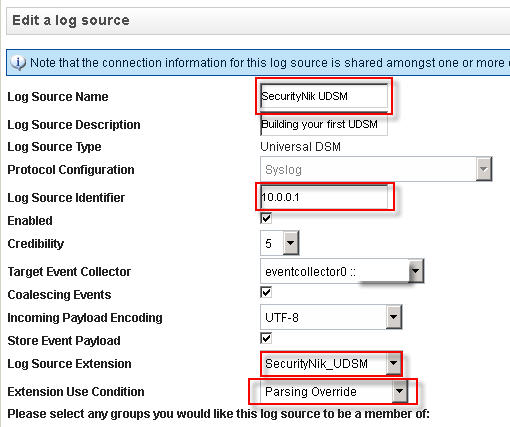


Once you have finished creating your log source, it is time to now "Deploy Changes" under the "Admin" tab.

So we have made progress but obviously we still have issues as some part of the log activity still shows unknown. Consider this good news as at least we know the data is being seen in QRadar.


Let's next double click on one of the "unknown" events. From the window select "Map Event". The objective here is to provide QRadar with an understanding of what the previous values represent, thus we need to map these to their equivalent QID.


Now that we have clicked "Map Event", let's go ahead and provide the necessary mappings.

Once everything goes well, you should see the following "The event mapping has been successfully saved. All future events matching these criteria will be mapped to the specified QID." which in this case is "59500166"
Voila, there you go, you have now built your first UDSM.

As always, hope you enjoyed reading this post. Maybe you can leave a comment to let me know if this was helpful.

If you use QRadar and would like me to consider doing more work on specific areas of QRadar leave a comment and I will see what's possible.

For further guidance on this see the references below:
References:
My LSX Example
https://www.ibm.com/developerworks/community/forums/html/topic?id=77777777-0000-0000-0000-000014970193

Intelligence Driven Cyber Analysis

Recently I was having a discussion about the importance of ensuring proper context, relevance and intelligence is provided when performing analysis of cyber related activities. Fortunately for me, a few days after, this article was published. While the article makes for very interesting read, the quote I like the most is “Network defenders who rely solely on lists of assets to protect are running a fool’s errand.”

As cyber security professionals or responsibilities start with first identifying the business’s critical assets not identifying the next new shiny technology and or tool. Once, we identify and understand our critical assets then we identify the technologies which may help the business protect and or secure those assets. Once we have cleared the two previous hurdles making the best use of the technology and securing the business and its assets goes beyond just the technology.

Most of the tools you will use, will generate some type of events which may result in an alert. The question is when you get that alert what do you next. Do you simply accept that alert and decide whether to act or not?! What is the context of the alert? What about relevance? Is the message which is generated relevant to your environment? Is the alert seen across one or more of your tools? Do you have full packet capture to look into the payload to ensure clarity? What additional intelligence do you have to support your conclusion? The point here is to ensure that you have as much data/intelligence from as much possible sources. It is very important that we understand that the sources of intelligence can be from one or more blacklist of bad IPs, domains and or URLs. It can be from end users who detected something of concern. It could be from a business partner. It can be from vulnerability data. It can be from … well you get the message. It can come from anywhere. However, no matter where it comes from, make sure it is relevant to your environment and identify the context within which it relates to your environment

Ultimately as a result of the alerts received from your tools, you should have only one of two end result. You should either be tuning out the alert if it is a false positive or act on it (take the host off the network, take a memory dump for later analysis, wipe, run antivirus, perform live analysis, etc) if it is a true positive. There should be no instance in which you simply ignore the message, it will do neither you nor the business any good.

5 tips for tuning your cyber security environment

Tuning your environment is the only way to ensure that you are not drowning in alerts and or some other form of notification. To help you optimize your tuning I suggest the following.  Note these tips are not related to any one tool but can be used as general guidance.

1.       Add enough intelligence to your tools during build out. Your cyber security tools may have the ability to injest vulnerability data, build out networks which are owned, identified and classify critical assets, etc. Take full advantage of these features where possible as the amount of planning you do upfront can have a significant impact on how much tuning, massaging and or time you will need to spend with your tool(s).

2.       Never (unless absolutely needed) tune out an entire host.
Meaning, if host 10.0.0.1:5000 -> 10.0.0.2:22 generated an alert and you think it is false positive, then tune out (where possible) the source host and destination host/port. This ensure that the legitimate communication does not create unnecessary alerts, while allowing anything else to generate alerts for those hosts. It is important however to understand even by narrowing the tuning to the specific source host and destination host/port, there is still a risk that malicious content can be passed. However, the risk when compared to the number of alerts which may be generated has to be weighed. From my perspective, the tuning option is worth the risk 

3.       Disable unused rules for services which are not used
If there is not a specific service(s) running in your environment, then there should be no need expending resources looking for this type of traffic. Obviously, this will not always work for everyone. As someone may wish to identify when these services do come online. I believe there are better ways for looking for when unsupported services and or devices are brought online. As a result, I believe the risk here when disabling rules for unused services is pretty low, so I have no problem with disabling these rules.

4.       Time is important
If you are aware that certain activities are legitimate from specific source and destination during certain hours, then ignore by tuning out those activities within those time window and focus on monitoring the activities outside of the time window.  Examples of this would be where there are specific remote jobs such as backups, file transfers, service accounts being used, etc. Monitoring these activities outside of business hours, may help to shed more light on what else they may be used for other than their intended purposes.

5.       Monitor what is important
Last but surely not least is monitoring what is important. Yeah we would like to monitor everything. However, the question I like to ask is will you action everything?! Most times the answer to that question will not be “no” but rather it will be “I can’t”. The fact that your tool(s) generate a “ton” of alerts only suggest that your tool is working, it does not say it is efficient. Make it efficient by only monitoring what is considered important.

Hope you enjoyed these 5 tips. Feel free to submit your comments with any suggestions you have that you think may be just as, less than or even more important.

Sunday, March 27, 2016

Learning about Mimikatz, SkeletonKey, Dumping NTDS.dit and Kerberos with Metasploit - Volatility Memory Analysis

Still continuing this journey looking into learning about Mimikatz, SkeletonKey, Dumping NTDS.dit and Kerberos with Metasploit, the focus of this post allows me to get a better understanding of how I may be able to use the mimikatz tool.

Similar to the log analysis, I wanted to see what I could learn about my activities from a memory analysis.

So the last thing I did before I shutdown the Windows 2008 box was to take a memory dump using DumpIt.


Once I had the memory image, the first thing I did was run the "imageinfo" module on it. Obviously I did not need this as I know what the image is, but force of habit and wanting to get information like the KDBG and KPCR, etc resulted in this command being run.
Above, we gather some information about the image.


Next let's look at the network connections using the "netscan" module to see what is established. However, looking for what is listening is just as important as it can tell you if there is a backdoor waiting for connections.

Below we see there are two established connections but the one that is of greatest interest to us is the one for "powershell.exe"
Let's take a look at the process list using the "pstree" module and focus on the "powershell.exe" process associated with PID "644".
I find this strange that this process has 0 threads and what looks like no handles as shown below. However, according to the Eric Pepke in this post, processes with 0 threads are zombie processes and will still have an entry in the process table. I'm ok with this explanation. Moving on!


Looking for more interesting stuff with the "pstree" module we see the following.

Above we see mimikatz has a PID of 3744. However, remember we migrated to process 2772 in this post. So the Parent of mimikatz is actually the conhost process we moved into once we gained access to the Windows server.

Additionally, as we look at the process tree we can also conclude that "esentutl" and "ntdsutil" are also children of "conhost" with PID 2772.

Let's poke around to see what we can learn from mimikatz
Using the "cmdline" module we see that mimikatz was started from "C:\x64\" folder

Let's run "cmdscan" to see what we can gather.


Looks like we got conformation that mimikatz was run from the command line.

Let's look a little deeper with the "consoles" module

From the above we learned a little bit more about the execution of mimikatz. 
Looks like this was mimikatz 2.1 x64 (oe.eo).
We also see here that mimikatz was attached and uses PID 3744. 


When I looked at the handles associated with PID 3744 (Mimikatz), I saw there was a handle of type process that was associated with "lsass.exe".

When I compared this to a few other processes, namely "svchost", "lsm", "ntfrs", "conhost", "vds" there was no reference for process lsass.exe. So I thought this was interesting.


Next up I ran the "malfind" module on the lsass process which PID is 448.


From the above it seems there is injected code in the lsass.exe process.

Next up I added the "--dump-dir=/tmp" to above and then submitted the file to VirusTotal


Finally, I wanted to confirm the permission mimikatz was running with and I did this using the "getsids" module as shown below.

Ok at this point I felt this was enough for now. Virustotal did not detect this as anything malicious. This could have been for a number of reasons, some of which could have been my fault. However, I know it's not an executable. More importantly I am still working on improving my reversing skills so I left this alone for now ;-)

Hope you enjoyed this series.

Reference:
https://www.quora.com/Can-a-process-have-0-threads-or-does-one-process-always-have-one-or-more-threads-of-execution
https://github.com/volatilityfoundation/volatility/wiki/Command-Reference
https://www.aldeid.com/wiki/Volatility

Posts in this series:
Learning about Mimikatz, SkeletonKey, Dumping NTDS.dit and Kerberos with Metasploit - Lab Setup
Learning about Mimikatz, SkeletonKey, Dumping NTDS.dit and Kerberos with Metasploit - Dumping the AD database
Learning about Mimikatz, SkeletonKey, Dumping NTDS.dit and Kerberos with Metasploit - Mimikatz
Learning about Mimikatz, SkeletonKey, Dumping NTDS.dit and Kerberos with Metasploit - Exporting Certificates
Learning about Mimikatz, SkeletonKey, Dumping NTDS.dit and Kerberos with Metasploit - Pass The Ticket (Golden Ticket)
Learning about Mimikatz, SkeletonKey, Dumping NTDS.dit and Kerberos with Metasploit - Skeleton Key
Learning about Mimikatz, SkeletonKey, Dumping NTDS.dit and Kerberos with Metasploit - Log Analysis
Learning about Mimikatz, SkeletonKey, Dumping NTDS.dit and Kerberos with Metasploit - Volatility Memory Analysis

Learning about Mimikatz, SkeletonKey, Dumping NTDS.dit and Kerberos with Metasploit - Log Analysis

Still continuing this journey looking into learning about Mimikatz, SkeletonKey, Dumping NTDS.dit and Kerberos with Metasploit, the focus of this post allows me to get a better understanding of how I may be able to use the mimikatz tool.

So yeah I spent time learning about the tools and what they do. However, are there any signs I may be able to use that may help us detect these activities. The reference section have suggestions for detecting and mitigating some of these activities I performed, more so around the mimikatz side of things. However, along with those I wanted to know what I may be able to detect from my lab.


So here we go .... Blast off!!!!!


When I'm investigating, I typically start with a trigger. Something that I'm aware of that may be the cause of the issue. In this case since I created the issue, I will started with a time window and then remove what I didn't want.


First thing that I detected in the Splunk log was
the strange computer name shown below.


Next I noticed a service with a strange name starting.


Not only was the name strange but it had what seems to be base64 encoded string and gzip compressed. So I wanted to peek a bit more into this.

I then copied the base64 encoded string and "echo" its value and "|" it into "base64 --decode" then sent this to a file named "services.gz" as shown below.


Next step was to verify the service.gz file was successfully created as shown below. Once it was I performed a "file" on it to verify it was gzip compressed. I wanted to peak at some details about the files so I ran a "gunzip --list" and finally "gunzip" the file. This then created an ASCII file as shown below.


Once this was all done, I now wanted to see what was in the ASCII file so I "cat" the file and found ...

..... it was more code. Time to move on for now as the objective of this post was not to analyze the code. However, by analyzing this code an analyst can get a better understanding of what the code is trying to do.


Something else that caught my attention was the starting and eventual running of the Volume Shadow Copy Service as shown below.


Do remember that in order for Metasploit to grab the database, it needed to start the service as it was not running. So this may be something to look for to see if Volume Shadow Copy service is being started on your Domain Controllers.

I then saw the "ntds.dit" location was changed. Another cause for concern?

The next image was also of concern to me because I know the conhost service is the one I migrated to. Therefore, I take it this service was responsible for initating the copy. Maybe in a future post I can look at the process or user who is responsible for starting this service. However, for now I know I migrated to the conhost process, so it's quite likely why I'm seeing this activity under this process.
Ok then, I'm not trying to make this post too long. However, the rest of the information which can be found in the reference section can help in detecting mimkatz and or its activities.

This post was just for me to see what else I may be able to see about my activities other than what was shown in the reference documents.


Reference:
http://dfir-blog.com/2015/12/13/protecting-windows-networks-kerberos-attacks/
https://adsecurity.org/?p=1275


Posts in this series:
Learning about Mimikatz, SkeletonKey, Dumping NTDS.dit and Kerberos with Metasploit - Lab Setup
Learning about Mimikatz, SkeletonKey, Dumping NTDS.dit and Kerberos with Metasploit - Dumping the AD database
Learning about Mimikatz, SkeletonKey, Dumping NTDS.dit and Kerberos with Metasploit - Mimikatz
Learning about Mimikatz, SkeletonKey, Dumping NTDS.dit and Kerberos with Metasploit - Exporting Certificates
Learning about Mimikatz, SkeletonKey, Dumping NTDS.dit and Kerberos with Metasploit - Pass The Ticket (Golden Ticket)
Learning about Mimikatz, SkeletonKey, Dumping NTDS.dit and Kerberos with Metasploit - Skeleton Key
Learning about Mimikatz, SkeletonKey, Dumping NTDS.dit and Kerberos with Metasploit - Log Analysis
Learning about Mimikatz, SkeletonKey, Dumping NTDS.dit and Kerberos with Metasploit - Volatility Memory Analysis

Learning about Mimikatz, SkeletonKey, Dumping NTDS.dit and Kerberos with Metasploit - Exporting Certificates

Still continuing this journey looking into learning about Mimikatz, SkeletonKey, Dumping NTDS.dit and Kerberos with Metasploit, the focus of this post allows me to get a better understanding of how I may be able to use the mimikatz tool.

When I performed this task within meterpreter, for whatever reason I was not successful. However, when I did on Windows I was ;-)

So here we go.
First up, I loaded mimikatz and verified that I was good to go.

Looks good!


Let's see what certificates are immediately available for the user.

So we have a certificate for administrator and its key is exportable too.

Let's export!

So Mimikatz claims it exported the public key as a .der file and the private key as a .pfx file. 

Let's verify this is so!

I Guess Mimikatz did not lie :-)

Let's add this to our personal store.


The password for the private key is "mimikatz".

Once the password is accepted we can complete the installation as shown below.


Let's now verify this is in our personal store.


Verify the thumbprint!


So we have the certificate installed and we have its private key.

What next should we do?

Let's make "Administrator" a recovery agent for the local user EFS encrypted file as we see below "Administrator" has "File Recovery" as one of its intended purposes.

So I created a file named "EFS Testing" and encrypted it with EFS as shown below. We can see the "Recovery Certificate" belongs to "SECURITYNIK\Administrator". This certificate came from the logged in administrator of the domain. Additionally, by looking at the Certificate Thumbprint, we know that this is the certificate we imported above.


So that's it for me on this post. Now that you have both the public and private key you can decide on what level of badness or goodness you would like to perform. Let your imagination run wild!


Posts in this series:
Learning about Mimikatz, SkeletonKey, Dumping NTDS.dit and Kerberos with Metasploit - Lab Setup
Learning about Mimikatz, SkeletonKey, Dumping NTDS.dit and Kerberos with Metasploit - Dumping the AD database
Learning about Mimikatz, SkeletonKey, Dumping NTDS.dit and Kerberos with Metasploit - Mimikatz
Learning about Mimikatz, SkeletonKey, Dumping NTDS.dit and Kerberos with Metasploit - Exporting Certificates
Learning about Mimikatz, SkeletonKey, Dumping NTDS.dit and Kerberos with Metasploit - Pass The Ticket (Golden Ticket)
Learning about Mimikatz, SkeletonKey, Dumping NTDS.dit and Kerberos with Metasploit - Skeleton Key
Learning about Mimikatz, SkeletonKey, Dumping NTDS.dit and Kerberos with Metasploit - Log Analysis
Learning about Mimikatz, SkeletonKey, Dumping NTDS.dit and Kerberos with Metasploit - Volatility Memory Analysis